


Real benchmark data and pricing compared, so you skip the trial-and-error and pick right the first time.
QUICK SUMMARY
MonoVM wins on choice. Pick it if you need a specific datacenter location, a Windows VPS, or a specialty setup like Forex or RDP that budget hosts skip. For raw price-per-gig, Contabo undercuts it. For raw benchmark speed and ecosystem tools, Vultr and DigitalOcean pull ahead. This MonoVM review breaks down where each one actually earns your money.
The short verdict
What I like
20+ global datacenter locations
Huge OS catalog, Windows Server 2025
Wide control panels, cPanel and Coolify
Fast provisioning, around 96 seconds
Specialty VPS, Forex, RDP, Minecraft
Full root access, KVM isolation
What I don’t
Mid-tier benchmarks on cheap plans
Low Trustpilot TrustScore
No native backups or load balancer
Not the cheapest entry price
MonoVM vs the main alternatives
| Provider | Entry price | Datacenter locations | OS + panel range | Native backups | Provisioning time | Best for |
|---|---|---|---|---|---|---|
| MonoVMFeatured | $5.99/mo Linux, $11.99/mo Windows | 20+ | Very wide, Windows Server 2025, cPanel, Plesk, Coolify | No (add-on) | ~96 sec | Location choice, Windows, specialty VPS |
| Contabo | ~$4.95/mo | 11 | Wide | No | Manual, slower | Most RAM per dollar |
| Vultr | $2.50/mo | 32 | Wide | Yes (paid) | Under 60 sec | Raw performance, API |
| Hetzner | ~€5.49/mo | 6 | Moderate | Yes (paid) | Under 60 sec | Best value in EU |
| DigitalOcean | $4/mo | 15 | Moderate | Yes (paid) | Under 60 sec | Developer ecosystem, docs |
Prices reflect published rates as of mid-2026 and change often. Verify before buying.
Key takeaways
MonoVM starts at $5.99/mo for Linux VPS and $11.99/mo for Windows VPS, mid-priced against the market.
It runs more than 20 datacenter locations across North America, Europe, Asia, the Middle East, and Australia.
Independent benchmarks grade the cheapest plans in the C-to-F range; NVMe SSD plans perform better.
Provisioning is fast at roughly 96 seconds from order to live server.
The OS and control-panel catalog is one of the widest around, from Windows Server 2025 to Coolify.
Trustpilot rates it low, so buy the tier that matches your workload and keep your own backups.
What MonoVM is and who runs it
MonoVM is a Lithuania-based VPS host running since 2012, with Linux plans from $5.99/mo and Windows plans from $11.99/mo across more than 20 datacenter locations.
Its strengths are location breadth, a large operating-system and control-panel catalog, and specialty VPS types like Forex and RDP.
Its weaknesses are middling benchmark scores on the cheapest plans and a low Trustpilot rating. This MonoVM review tests the specs against real data and tells you exactly which use case fits and which does not. Read the comparison table before you decide.
MonoVM launched as a VPS provider in 2012 and operates from Lithuania with a team of 50 to 200 people [1].
It sells four product lines, VPS hosting, dedicated servers, web hosting, and domains, so it functions as a full hosting shop rather than a single-product startup.
The underlying hardware matters more than the brand, so here are the specifics. MonoVM runs NVMe SSD storage, ECC RAM (memory that self-corrects errors, which reduces crashes on long-running servers), and Intel Xeon and AMD processors [2].
Virtualization uses KVM, which gives each VPS its own isolated kernel and full root access rather than a shared container. That isolation is why you can run custom kernels, load your own modules, and treat the box like a real machine.
Thirteen years in business tells you something. Plenty of low-end hosts appear, oversell capacity, and vanish inside two years. MonoVM has outlasted that cycle. Longevity is not the same as top-tier performance, and I’ll get to the performance data shortly, but a host that survives more than a decade has cleared a bar that most budget providers never reach.
MonoVM pricing breakdown
Pricing is where you decide if MonoVM belongs on your shortlist, so let’s put real numbers on the table. Linux VPS starts at $5.99/mo, and Windows VPS starts at $11.99/mo [3][4].
The Windows premium is normal and reflects Microsoft licensing, not a MonoVM markup.
Here is the Linux ladder based on published and benchmarked plans [5]:
| Plan | vCPU | RAM | Storage | Price |
|---|---|---|---|---|
| Linux 512 MB | 1 core | 512 MB | 15 GB SSD | $6.00/mo |
| Linux 1024 MB | 1 core | 1 GB | 30 GB | $12.99/mo |
| NVMe Linux 2048 | 2 cores | 2 GB | 20 GB NVMe | $19.99/mo |
| NVMe Linux 4096 | 4 cores | 4 GB | 30 GB NVMe | $29.99/mo |
| NVMe Linux 8192 | 6 cores | 8 GB | 50 GB NVMe | $64.99/mo |
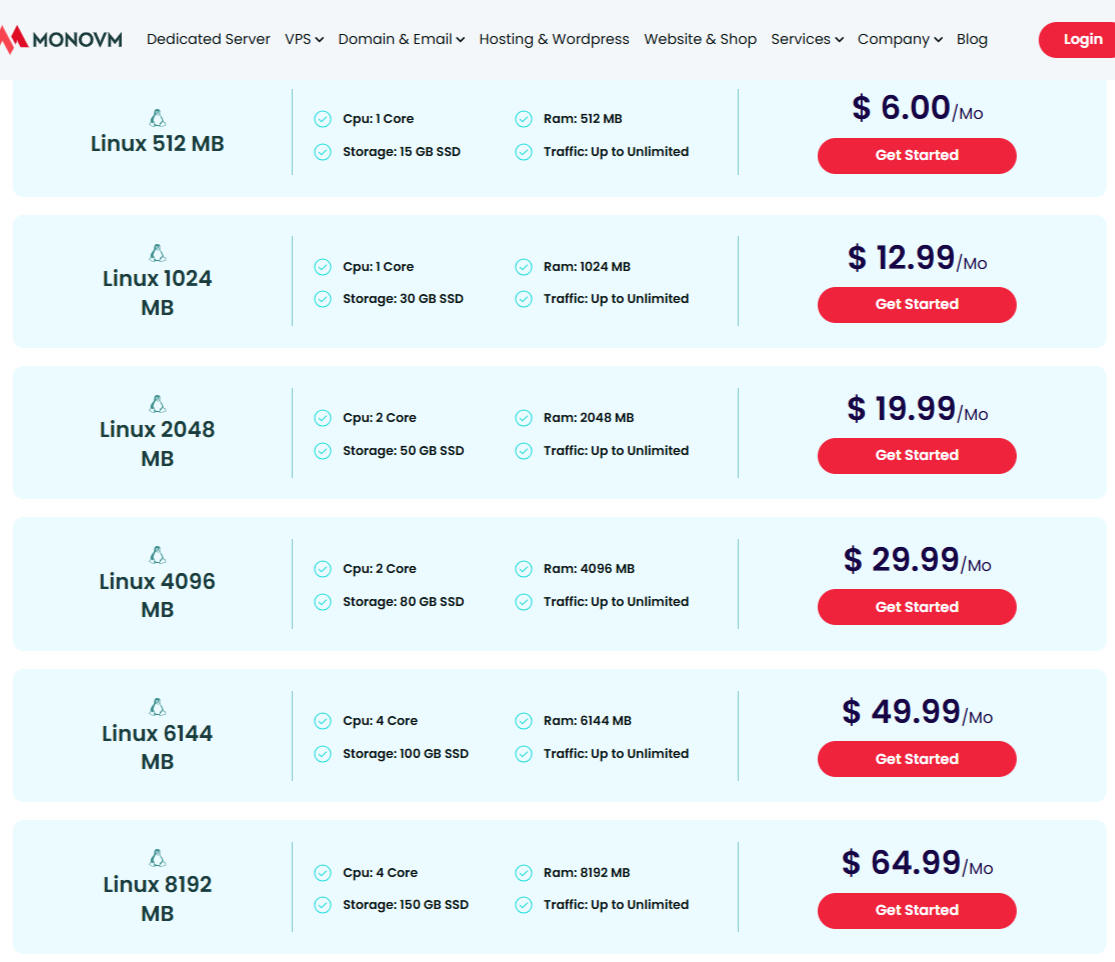
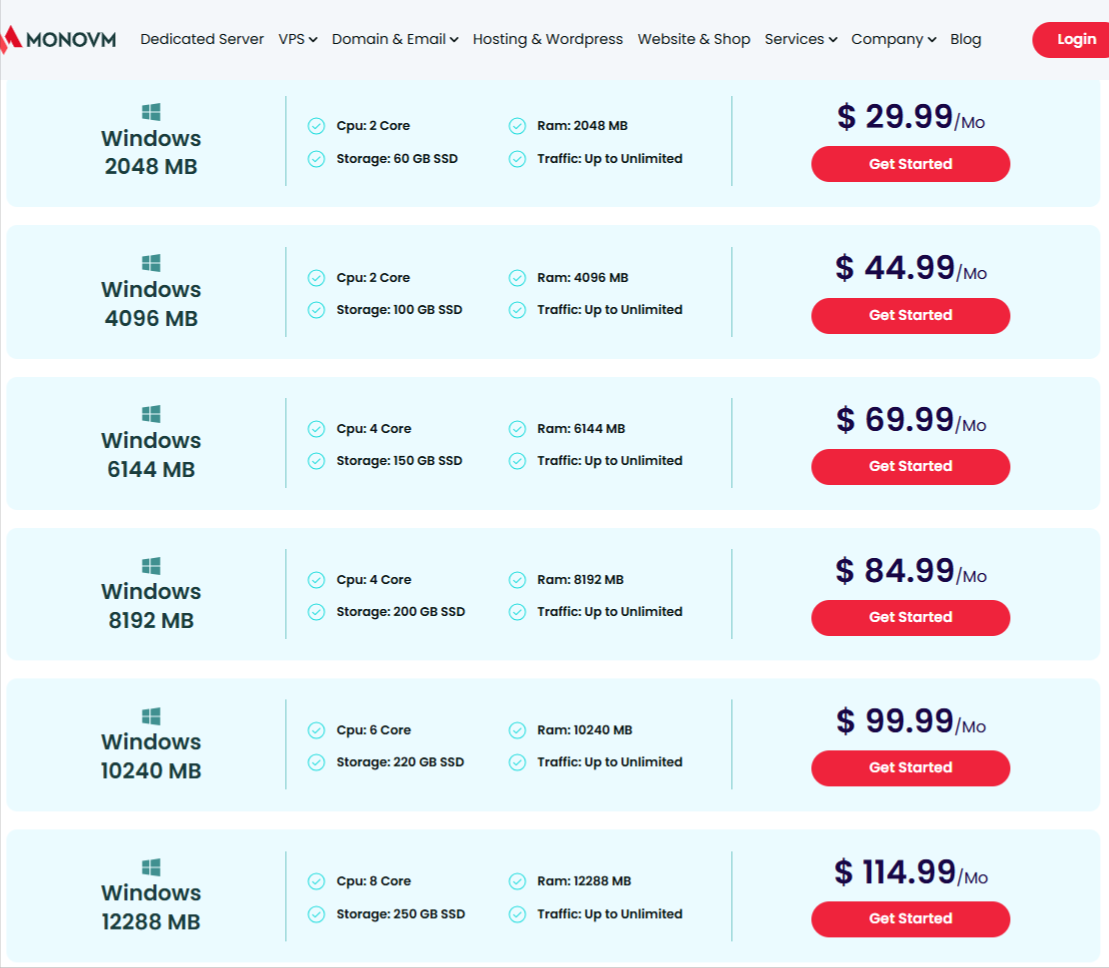
Now the honest part. MonoVM is not the cheapest host in this market. Vultr starts at $2.50/mo, DigitalOcean at $4/mo, and Contabo at roughly $4.95/mo, and Contabo hands you far more RAM per dollar than anyone here [6][7][8].
If your only metric is gigabytes-per-dollar, MonoVM loses that fight before it starts.
So what does the premium buy? Location choice and OS flexibility, which I cover below. You pay MonoVM for the ability to put a Windows VPS in Hong Kong or a Forex node in London, options the cheapest hosts do not offer. If you do not need those, cheaper providers exist. If you do, the price gap is small and the alternative is stitching together two providers.
One gap to flag is that VPS pricing here does not bundle native backups, block storage, or a load balancer, features Vultr and DigitalOcean include as paid add-ons in a tighter package [9].
Budget for backups separately.
Performance and benchmarks, the real test
Pricing looks reasonable on paper. Performance is where cheap VPS hosts usually fall apart, so this is the section that decides the review.
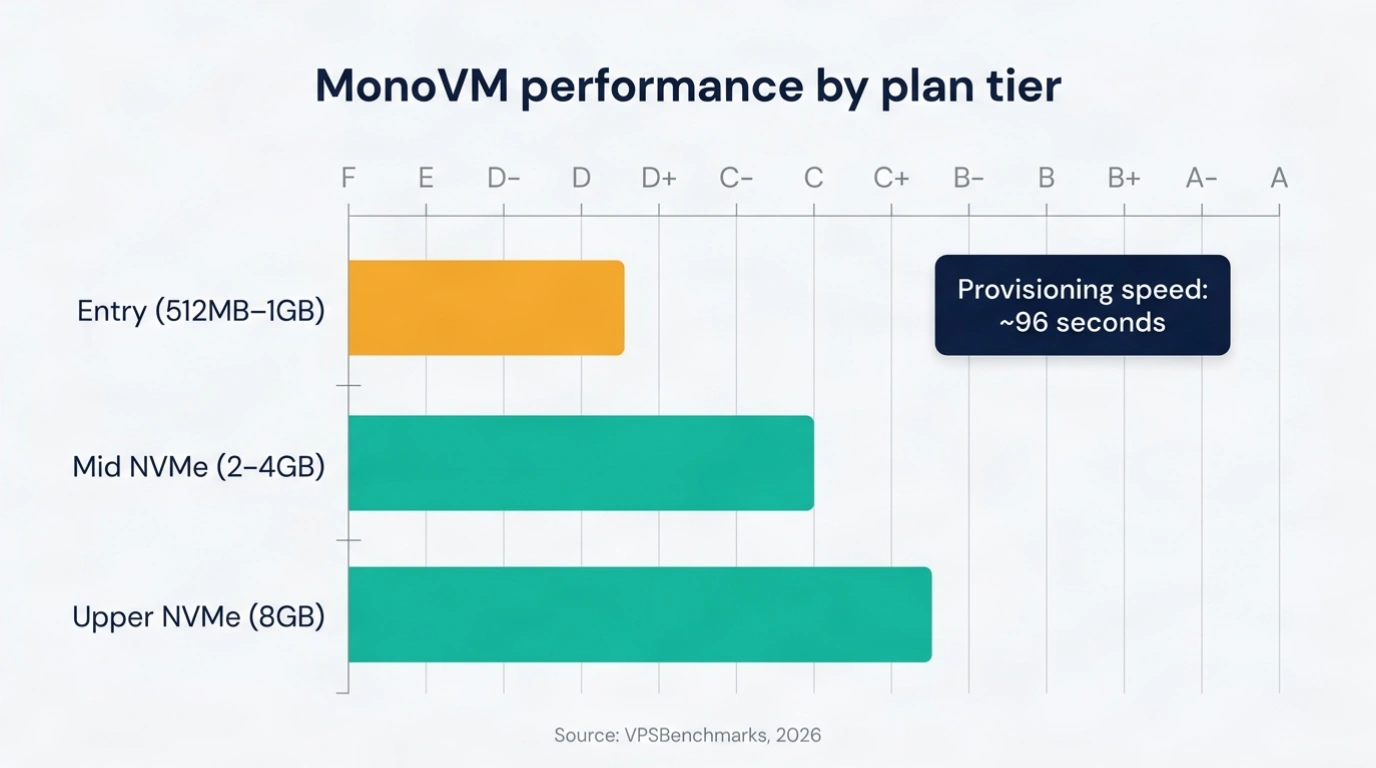
VPSBenchmarks ran eight MonoVM plans through web, CPU, disk, and network tests. The results are mixed, and I’ll give them to you straight. The cheapest plans grade in the C-to-F range across raw CPU power and disk IO, while the mid and upper NVMe SSD plans climb toward C-grade web performance [9].
The performance-stability score across the lineup sits around 39 out of 100, which reads as moderate, meaning your server speed can wobble under load rather than holding a flat line [9].
That number surprised me less than it might surprise you. Entry-tier VPS plans at almost every budget host share CPU cores across many tenants, so a $6 plan grading like a $6 plan is expected, not scandalous.
What matters is the shape of the data. Performance rises clearly when you move from the standard cheap plans to the NVMe tiers. The disk jump alone is worth it, since NVMe storage reads and writes several times faster than the SATA SSDs on the entry plans.
One metric genuinely impressed me. MonoVM provisions a new server in about 96 seconds from order to live root login [9].
That is fast. Some larger hosts make you wait several minutes or trigger a manual review. Fast provisioning matters when you are spinning up and tearing down test environments or need a box live during an incident.
“So is MonoVM fast enough for production?” Depends on the plan. The 512 MB and 1 GB plans suit small sites, bots, dev sandboxes, and light services. For a production app with real traffic, skip straight to the 4 GB NVMe tier or higher, where the benchmarks stop looking budget and start looking usable. Do not run a serious workload on the entry plan and then blame the host.
Datacenter locations and why they matter
Here is MonoVM’s genuine edge. It runs VPS hosting in more than 20 datacenter locations spanning North America, Europe, Asia, the Middle East, and Australia [1][10].
The confirmed list includes the United States, Canada, United Kingdom, Germany, France, Netherlands, Switzerland, Austria, Sweden, Denmark, Poland, Romania, Turkey, United Arab Emirates, Hong Kong, Singapore, and Australia [1].
Compare that to Hetzner’s 6 locations or Contabo’s 11, and the gap is obvious.

Why should you care? Latency.
The physical distance between your server and your users adds milliseconds to every request, and those milliseconds compound. A user in Singapore hitting a server in Germany feels the lag. Put the server in Singapore and the same app feels instant. For a trading bot, a game server, or an app serving a specific region, location is not a nice-to-have, it decides whether the product works.
This is also why MonoVM justifies its price against cheaper rivals. Contabo gives you more RAM, but it cannot give you a datacenter in Turkey or the UAE. If your users or your compliance rules require data in a specific country, MonoVM’s location count moves it from “one option” to “one of the few options.”
OS, control panels, and specialty VPS
MonoVM’s second real strength is how many ways you can configure a box.
The operating-system catalog covers AlmaLinux, Ubuntu, Debian, Rocky Linux, CentOS Stream, and FreeBSD on the Linux and Unix side, plus Windows Server editions through 2025 and even MikroTik RouterOS for network engineers [2].
That range is wider than most budget hosts bother with. A Windows VPS with the latest Server build, ready in under two minutes, is not something Contabo or Hetzner makes as easy.
On control panels, you get cPanel, Plesk, DirectAdmin, CyberPanel, Coolify, and Dokploy as deployable options [2]. cPanel and Plesk cover traditional web hosting management. Coolify and Dokploy are modern self-hosted deployment tools, closer to a private Heroku, and seeing them offered signals MonoVM tracks what developers actually use in 2026.
Then there are the specialty VPS types. MonoVM sells purpose-tuned plans for Forex trading (low-latency VPS near broker servers), Minecraft and game hosting, crypto nodes, and RDP (Remote Desktop Protocol, a Windows remote-access setup people use for a cloud desktop) [2].
Budget hosts rarely package these. If you searched for a Forex VPS or an RDP VPS and landed on a generic provider, this is where MonoVM separates itself.
With full root access on every plan, you can override any of the defaults and build the box exactly how you want.
What I like and what I don’t
Let me give you my direct read after going through the specs and data.
What I like.
- The location count is the headline, and it is real, more than 20 datacenters is rare at this price.
- The OS and control-panel range is excellent, and the specialty VPS lineup fills gaps that force other users onto niche providers.
- The 96-second provisioning is genuinely fast and useful.
- Full root access with KVM isolation means no artificial container limits.
What I don’t.
- The cheapest plans benchmark like cheap plans, so entry-tier buyers expecting production speed will be let down.
- There are no native backups bundled in, which is a real omission when Vultr and DigitalOcean include them.
- And the Trustpilot rating, covered next, is low enough that I cannot wave it away.
- MonoVM is a strong pick for the right job and a mediocre one if you buy the wrong tier.
What other users say
Reviews are where marketing meets reality, so I read through user feedback rather than trusting the sales page.
On MonoVM’s own review collection, customers repeatedly praise affordability and helpful support. One reviewer wrote that after trying multiple hosting providers, MonoVM’s pricing was among the most affordable and the service was strong [11].
Comments like that cluster around the value angle and the ease of getting a Windows VPS running.
The harder data point is Trustpilot, where MonoVM sits at a low TrustScore around 2 out of 5 [12].
That gap between glowing on-site reviews and a weak third-party score is worth taking seriously, though it is also common for hosting brands, where frustrated users leave reviews far more often than satisfied ones.
The recurring themes in critical reviews tend to be support response times and billing friction rather than servers failing outright.
My take, softened but honest. Do not read the Trustpilot number as “the servers are broken,” because the benchmark and uptime data do not support that. Read it as “set your expectations on support, keep your own backups, and test with a small plan first.”
That is sensible advice for any budget-to-mid VPS host, not just this one.
Start with a small MonoVM plan to test support and speed before scaling up →
How MonoVM compares to alternatives
You are comparing options, so here is the straight head-to-head.
- Choose Contabo if RAM-per-dollar is your only metric. It starts near $4.95/mo and gives you dramatically more memory at the same price [8]. The trade-off is fewer locations and slower manual provisioning.
- Choose Vultr or DigitalOcean if you want top benchmark performance and a full developer ecosystem. Vultr starts at $2.50/mo and DigitalOcean at $4/mo, both provision in under a minute, both bundle backups as paid add-ons, and both offer mature APIs and documentation [6][7]. If you deploy through code and want the richest tooling, they win.
- Choose Hetzner if you are in Europe and want the best raw value, starting near €5.49/mo, though its 6 locations limit you geographically [13].
- Choose MonoVM when your need is specific. A datacenter in a country the others skip. A Windows VPS with Server 2025 ready in 96 seconds. A Forex or RDP VPS you would otherwise buy from a pricier niche host. MonoVM does not win the price war or the benchmark war, and I won’t pretend it does. It wins the flexibility war, and for a large slice of buyers, that is the war that matters.
Who should choose MonoVM, the verdict
Here is my final call after this MonoVM review. Buy MonoVM if you need location choice, a Windows VPS, or a specialty setup like Forex, RDP, or a game server, and buy the 4 GB NVMe tier or higher if the workload is production-facing. Skip it if you only want the absolute cheapest gigabytes, where Contabo wins, or the absolute fastest benchmarks with the deepest tooling, where Vultr and DigitalOcean win.
MonoVM is a flexible, location-rich, mid-priced VPS host with genuine strengths and honest weaknesses. It is not the answer for everyone, and any review claiming it is would be lying to you. For buyers who value where their server lives and how it is configured over rock-bottom price, it earns a spot on the shortlist.
Compare MonoVM plans by location and OS, then start small and scale once it proves itself.
CITATIONS AND METHODOLOGY
This MonoVM review draws on independent benchmark data, the provider’s published specifications, third-party review platforms, and current competitor pricing pages, all gathered in mid-2026.
Performance grades and infrastructure details come from VPSBenchmarks, which tested eight MonoVM plans across web, CPU, disk, and network workloads, last updated June 2026.
Pricing and specifications for the plan ladder come from MonoVM’s own VPS, Linux VPS, and Windows VPS pages, cross-checked against VPSBenchmarks plan listings.
User sentiment combines MonoVM’s on-site review collection with Trustpilot’s third-party score, which I weighted toward the independent source.
Competitor pricing for Contabo, Vultr, Hetzner, and DigitalOcean comes from each provider’s official pricing pages and pricing trackers current as of mid-2026.
Citations
- VPSBenchmarks – “MonoVM: performance, features and prices” – 2026
- MonoVM – “Buy VPS Hosting – 25+ Global Datacenters” – 2026
- MonoVM – “Powerful Linux VPS Hosting for Every Need” – 2026
- MonoVM – “Windows VPS Hosting” – 2026
- VPSBenchmarks – “MonoVM VPS Plans” – 2026
- Vultr – “Vultr Pricing” – 2026
- DigitalOcean – “Droplet Pricing” – 2026
- Contabo – “Contabo VPS Pricing” – 2026
- VPSBenchmarks – “MonoVM Performance Grades” – June 2026
- MonoVM – “Global 25+ VPS Locations Worldwide” – 2026
- MonoVM – “MonoVM VPS Reviews” – 2025
- Trustpilot – “MonoVM Customer Service Reviews” – 2026
- Hetzner – “Cloud Hosting Pricing” – 2026
